Using Semantic Kernel Plugins: A Developer's Guide
Summary
In my previous post about Semantic Kernel, I described the basic ideas about Semantic Kernel. In that example, we used the kernel to essentially call the OpenAI model and retrieve information from it - something we could easily code ourselves. Now, things will get more interesting because we’ll experiment with plugins. This is a very powerful feature that enhances our work with models, and thanks to Semantic Kernel, we save time by not having to code it ourselves.
What Are Semantic Kernel Plugins? 🔌
Plugins are basically functions that can be used by the model. Thanks to them, we are able to increase the capabilities of LLMs to generally everything we are able to code and then give the model to use in the proper situation. They expand model capabilities by providing access to data and functionality beyond what the model was trained on.
Under the hood, Semantic Kernel uses function calling - a built-in feature of modern LLMs. This allows AI models to request and use your custom functions.
Here’s how it works: When the AI needs to perform a specific action, it can “call” one of your plugin functions. Semantic Kernel then takes this request, runs the appropriate function in your code, and sends the results back to the AI model.
💡 Important Note: Remember that when using plugins, we need to send plugin information to the model, which requires additional tokens and increases the cost of our requests. To save money, only declare plugins for specific cases that will actually be useful for your application.
Plugin Types and Import Methods 📦
- Native Code Plugins: Creating plugins from C# classes with
[KernelFunction]- this is the part we will be focusing on today. - OpenAPI Plugins: Importing plugins from OpenAPI specifications
- MCP Server Plugins: Using Model Context Protocol servers
Some examples of how plugins can be used 💼
- LightsPlugin: Smart home device control
- Database Plugin: CRUD operations with Entity Framework
- Email Plugin: Sending notifications via SMTP/SendGrid
- File Processing Plugin: Document manipulation and processing
- Weather Plugin: Integrating with OpenWeatherMap API - I will demonstrate this part
Creating Native Plugins 🛠️
Let’s dive into creating a plugin. Here’s an example of a WeatherPlugin that demonstrates how to build Semantic Kernel plugins:
public class WeatherPlugin
{
    private readonly HttpClient _httpClient;
    private readonly string _apiKey;

    public WeatherPlugin(HttpClient httpClient, string apiKey)
    {
        _httpClient = httpClient;
        _apiKey = apiKey;
    }

    [KernelFunction("get_current_weather")]
    [Description("Gets the current weather for a specified city")]
    public async Task<WeatherModel> GetCurrentWeatherAsync(
        [Description("The city name to get weather for")] string city)
    {
        try
        {
            var url = $"https://api.openweathermap.org/data/2.5/weather?q={city}&appid={_apiKey}&units=metric";
            var response = await _httpClient.GetStringAsync(url);
            var weatherData = JsonSerializer.Deserialize<WeatherResponse>(response);

            return new WeatherModel
            {
                City = city,
                Description = weatherData.Weather[0].Description,
                Temperature = weatherData.Main.Temp,
                FeelsLike = weatherData.Main.FeelsLike,
                Humidity = weatherData.Main.Humidity,
                WindSpeed = weatherData.Wind.Speed,
                CountryCode = weatherData.Sys.Country
            };
        }
        catch (Exception ex)
        {
            throw new Exception($"Couldn't get weather data for {city}. Error: {ex.Message}");
        }
    }

    [KernelFunction("get_clothing_recommendation")]
    [Description("Provides clothing recommendations based on temperature")]
    public string GetClothingRecommendation(
        [Description("Temperature in Celsius")] double temperature)
    {
        return temperature switch
        {
            < 0 => "Bundle up! Wear a heavy winter coat, warm hat, gloves, and insulated boots.",
            >= 0 and < 10 => "Cool weather: Wear a warm jacket, long pants, and closed shoes.",
            >= 10 and < 20 => "Mild weather: A light jacket or sweater with long pants works well.",
            >= 20 and < 25 => "Pleasant weather: T-shirt or light shirt with jeans or shorts.",
            >= 25 and < 30 => "Warm weather: Light, breathable clothing like cotton t-shirt and shorts.",
            >= 30 => "Hot weather: Minimal, light-colored clothing, sunhat, and stay hydrated!"
        };
    }

    [KernelFunction("convert_to_fahrenheit")]
    [Description("Converts temperature from Celsius to Fahrenheit")]
    public double ConvertToFahrenheit(
        [Description("Temperature in Celsius")] double celsius)
    {
        return (celsius * 9 / 5) + 32;
    }

    [KernelFunction("get_weather_recommendations")]
    [Description("Provides general activity recommendations based on weather conditions")]
    public string GetWeatherRecommendations(
        [Description("Weather description (e.g., 'sunny', 'rainy', 'cloudy')")] string weather_condition,
        [Description("Temperature in Celsius")] double temperature)
    {
        var recommendations = new List<string>();

        if (temperature > 25)
            recommendations.Add("Great weather for outdoor activities like picnics or beach visits");
        else if (temperature > 15)
            recommendations.Add("Perfect for walking, cycling, or outdoor sports");
        else if (temperature > 5)
            recommendations.Add("Good for a brisk walk, but consider indoor activities too");
        else
            recommendations.Add("Better to stay indoors or dress very warmly if going out");

        var condition = weather_condition.ToLower();
        if (condition.Contains("sunny") || condition.Contains("clear"))
            recommendations.Add("Don't forget sunscreen and sunglasses");
        else if (condition.Contains("rain"))
            recommendations.Add("Bring an umbrella and wear waterproof clothing");
        else if (condition.Contains("snow"))
            recommendations.Add("Drive carefully and wear non-slip shoes");
        else if (condition.Contains("wind"))
            recommendations.Add("Secure loose items and be cautious of falling debris");

        return string.Join(". ", recommendations) + ".";
    }
}
This example demonstrates several key concepts:
Key Plugin Features Demonstrated
KernelFunction: Should be a descriptive name of the plugin. Microsoft recommends to use snake case:
💡Since most LLMs have been trained with Python for function calling, its recommended to use snake case for function names and property names even if you’re using the C# or Java SDK. Learn more
Description: Explanation of what a given function or parameter does and when the model should use it. It should provide clear explanations.
Parameters: Could be simple ones or we can provide a complex type with descriptions. For the model, the most difficult to use is a string.
Return Type: Descriptions should contain what plugins return, or if this is a complex object, we can add descriptions for the LLM ourselves. I experienced a situation during testing of this example where I hadn’t added what metric the temperature was in, so the model asked twice for it, and then used a convert function.
Example for returning model of weather:
public class WeatherModel
{
    [JsonPropertyName("city")]
    [Description("The name of the city")]
    public string City { get; set; }

    [JsonPropertyName("description")]
    [Description("Description of the weather conditions")]
    public string Description { get; set; }

    [JsonPropertyName("temperature")]
    [Description("Temperature in Celsius")]
    public double Temperature { get; set; }

    [JsonPropertyName("feels_like")]
    [Description("How the temperature feels like")]
    public double FeelsLike { get; set; }

    [JsonPropertyName("humidity")]
    [Description("Humidity percentage")]
    public int Humidity { get; set; }

    [JsonPropertyName("wind_speed")]
    [Description("Wind speed in meters per second")]
    public double WindSpeed { get; set; }

    [JsonPropertyName("country_code")]
    [Description("The country code where the city is located")]
    public string CountryCode { get; set; }
}
💡 More Examples: A lot more plugin usage examples are available here: https://github.com/microsoft/semantic-kernel/tree/main/dotnet/samples/Concepts/Plugins
Function Invocation Logging 📊
For invocation logging I will be using IAutoFunctionInvocationFilter. Learn more
public class AutoInvocationFilter : IAutoFunctionInvocationFilter
{
    public async Task OnAutoFunctionInvocationAsync(AutoFunctionInvocationContext context, Func<AutoFunctionInvocationContext, Task> next)
    {
        var functionName = context.Function.Name;
        var pluginName = context.Function.PluginName ?? "Unknown plugin";
        var description = context.Function.Description ?? "No description available";
        var parameters = context.Arguments;

        Console.ForegroundColor = ConsoleColor.Cyan;
        Console.WriteLine($"┌────────────────────────────────────────────────────────────────────────────────────────────────────────────────");
        Console.WriteLine($"│ FUNCTION INVOCATION: {pluginName}.{functionName}");
        Console.WriteLine($"│ Start time: {DateTime.Now:HH:mm:ss.fff}");
        Console.WriteLine($"│ Description: {description}");

        var metadata = context.Function.Metadata;

        var parameterMetadata = context.Function.Metadata.Parameters;
        if (parameterMetadata.Count > 0)
        {
            Console.WriteLine($"│ Parameter Definitions:");
            foreach (var param in parameterMetadata)
            {
                Console.WriteLine($"│   - {param.Name}: {param.ParameterType} {(param.IsRequired ? "(Required)" : "(Optional)")}");
                if (!string.IsNullOrEmpty(param.Description))
                {
                    Console.WriteLine($"│     Description: {param.Description}");
                }
            }
        }
        else
        {
            Console.WriteLine($"│ Parameter Definitions: None");
        }

        if (parameters?.Count > 0)
        {
            Console.WriteLine($"│ Arguments Passed:");
            foreach (var param in parameters)
            {
                Console.WriteLine($"│   - {param.Key}: {param.Value}");
            }
        }
        else
        {
            Console.WriteLine($"│ Arguments Passed: None");
        }

        Console.WriteLine($"└────────────────────────────────────────────────────────────────────────────────────────────────────────────────");
        Console.ResetColor();

        var stopwatch = Stopwatch.StartNew();

        try
        {
            await next(context);

            stopwatch.Stop();

            Console.ForegroundColor = ConsoleColor.Green;
            Console.WriteLine($"┌────────────────────────────────────────────────────────────────────────────────────────────────────────────────");
            Console.WriteLine($"│ FUNCTION COMPLETED: {pluginName}.{functionName}");
            Console.WriteLine($"│ Execution time: {stopwatch.ElapsedMilliseconds} ms");

            Console.WriteLine($"│ Result: {context.Result}");

            Console.WriteLine($"└────────────────────────────────────────────────────────────────────────────────────────────────────────────────");
            Console.ResetColor();
        }
        catch (Exception ex)
        {
            stopwatch.Stop();

            Console.ForegroundColor = ConsoleColor.Red;
            Console.WriteLine($"┌────────────────────────────────────────────────────────────────────────────────────────────────────────────────");
            Console.WriteLine($"│ ERROR IN FUNCTION: {pluginName}.{functionName}");
            Console.WriteLine($"│ Execution time until error: {stopwatch.ElapsedMilliseconds} ms");
            Console.WriteLine($"│ Exception: {ex.GetType().Name}");
            Console.WriteLine($"│ Message: {ex.Message}");
            Console.WriteLine($"│ Stack trace:");
            Console.WriteLine($"│ {ex.StackTrace?.Replace("\n", "\n│ ")}");
            Console.WriteLine($"└────────────────────────────────────────────────────────────────────────────────────────────────────────────────");
            Console.ResetColor();
              throw;
        }
    }
}
Plugin Usage Example 💻
Our example of plugin usage looks like this:
using Microsoft.Extensions.DependencyInjection;
using Microsoft.SemanticKernel;
using Microsoft.SemanticKernel.ChatCompletion;
using Microsoft.SemanticKernel.Connectors.OpenAI;
using System.Diagnostics;
using OpenAI.Chat;
using ChatMessageContent = Microsoft.SemanticKernel.ChatMessageContent;

const string modelId = "gpt-4.1-mini";
const string apiKey = ""; // Replace with your key
const string weatherApiKey = ""; // Replace with your key

var kernelBuilder = Kernel.CreateBuilder();

// Add AI services
kernelBuilder.Services.AddOpenAIChatCompletion(modelId, apiKey);

// Add logging services
kernelBuilder.Services.AddLogging();

// In production, you would rather reuse an existing HttpClient instance
var httpClient = new HttpClient();
var weatherPlugin = new WeatherPlugin(httpClient, weatherApiKey);

kernelBuilder.Plugins.AddFromObject(weatherPlugin, "weather_plugin");

// Register the auto invocation filter
kernelBuilder.Services.AddSingleton<IAutoFunctionInvocationFilter, AutoInvocationFilter>();

var kernel = kernelBuilder.Build();
var chatCompletionService = kernel.GetRequiredService<IChatCompletionService>();

// Enable planning
var settings = new OpenAIPromptExecutionSettings()
{
    FunctionChoiceBehavior = FunctionChoiceBehavior.Auto()
};

await RunWeatherAssistant(chatCompletionService, kernel, settings);

static async Task RunWeatherAssistant(IChatCompletionService chatCompletionService, Kernel kernel, OpenAIPromptExecutionSettings settings)
{
    var history = new ChatHistory();
    history.AddSystemMessage(@"You are a helpful weather assistant. You can:
            1. Get current weather for any city
            2. Provide clothing recommendations based on temperature
            3. Convert temperatures between Celsius and Fahrenheit
            4. Give general activity recommendations based on weather

            Always be friendly and provide practical advice.");

    Console.Write("Ask me about weather: ");
    var input = Console.ReadLine();

    history.AddUserMessage(input);

    var result = await chatCompletionService.GetChatMessageContentAsync(
        history,
        executionSettings: settings,
        kernel: kernel
    );

    ShowResponseInfo(result);
}

static void ShowResponseInfo(ChatMessageContent response)
{
    Console.ForegroundColor = ConsoleColor.Magenta;
    Console.WriteLine($"┌────────────────────────────────────────────────────────────────────────────────────────────────────────────────");
    Console.WriteLine($"│ MODEL RESPONSE");
    Console.WriteLine($"│");
    foreach (var line in response.Content.Split('.'))
    {
        Console.WriteLine($"│ {line}");
    }
    Console.WriteLine($"│");
    Console.WriteLine($"└────────────────────────────────────────────────────────────────────────────────────────────────────────────────");
    Console.ResetColor();

    if (response.Metadata != null && response.Metadata.TryGetValue("Usage", out var usageObj))
    {
        var usage = usageObj as ChatTokenUsage;
        Console.ForegroundColor = ConsoleColor.Yellow;
        Console.WriteLine($"┌────────────────────────────────────────────────────────────────────────────────────────────────────────────────");
        Console.WriteLine($"│ TOKEN USAGE INFORMATION");

        if (usage != null)
        {
            Console.WriteLine($"│ InputTokenCount: {usage.InputTokenCount}");
            Console.WriteLine($"│ OutputTokenCount Tokens: {usage.OutputTokenCount}");
            Console.WriteLine($"│ Total Tokens: {usage.TotalTokenCount}");
        }
        else
        {
            Console.WriteLine($"│ Usage information available but could not be parsed");
        }

        Console.WriteLine($"└────────────────────────────────────────────────────────────────────────────────────────────────────────────────");
        Console.ResetColor();
    }
}
Plugin Execution Results 🎯
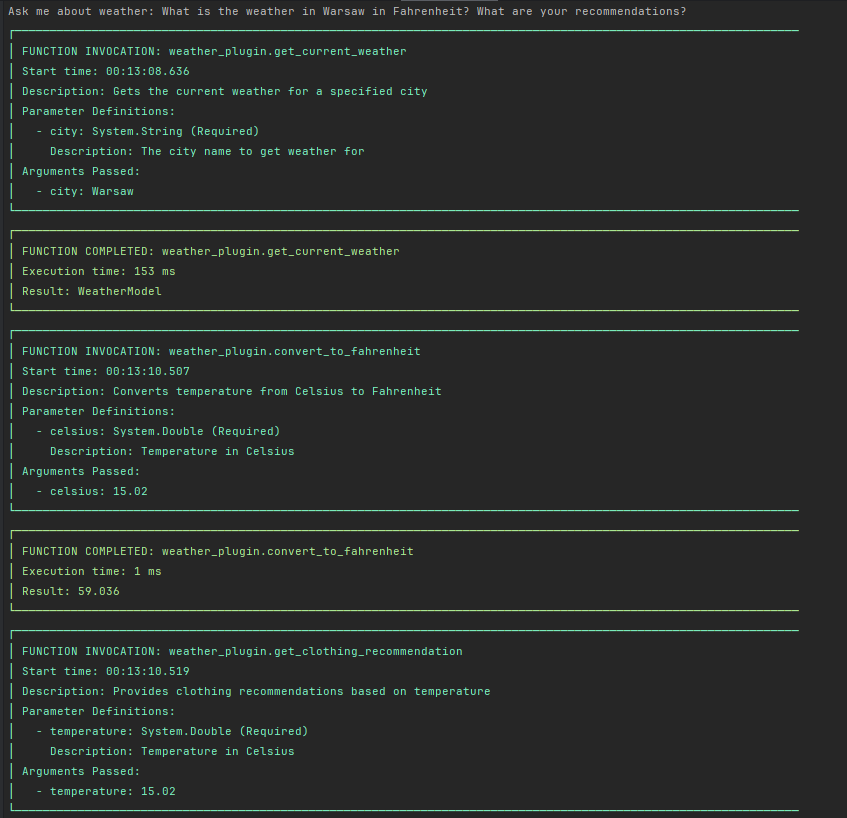
When we run our weather assistant with the question “What is the weather in Warsaw in Fahrenheit? What are your recommendations?”, here’s what happens:
The logging filter shows us exactly how the AI model chains multiple function calls together:
- First: Gets current weather for Warsaw
- Second: Converts temperature from Celsius to Fahrenheit
- Third: Gets clothing recommendations based on temperature
- Fourth: Gets general activity recommendations based on weather conditions
Here’s the complete console output:
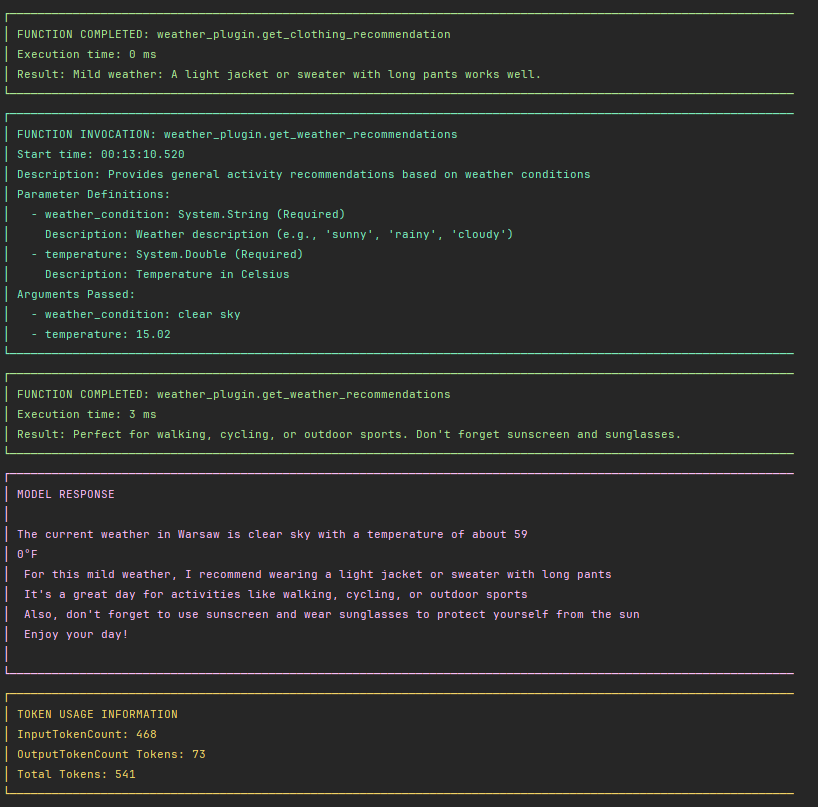
This demonstrates how Semantic Kernel plugins can transform a simple weather API into an intelligent assistant that provides contextual, actionable advice.
Best Practices from Microsoft ✅
- Import only necessary plugins (max 10-20 functions per call)
- Use descriptive function and parameter names
- Minimize number of function parameters
Function Choice Behavior Options 🎛️
Now, let’s focus on kernel execution planning options.
We’ve used FunctionChoiceBehavior.Auto() but this is not the only option.
var settings = new OpenAIPromptExecutionSettings()
{
    FunctionChoiceBehavior = FunctionChoiceBehavior.Auto()
};
We can also list specific functions that the model can use:
var functionToExecute = kernel.Plugins.GetFunction("weather_plugin", "get_current_weather");
var settings = new OpenAIPromptExecutionSettings()
{
    FunctionChoiceBehavior = FunctionChoiceBehavior.Auto(functions: new []{ functionToExecute })
};
Above, the model also has the freedom to choose, but it can only use the one passed function.
If we want, we can also force the model to use a function like this:
var functionToExecute = kernel.Plugins.GetFunction("weather_plugin", "get_current_weather");
var settings = new OpenAIPromptExecutionSettings()
{
    FunctionChoiceBehavior = FunctionChoiceBehavior.Required(functions: new []{ functionToExecute })
};
and the result will be:
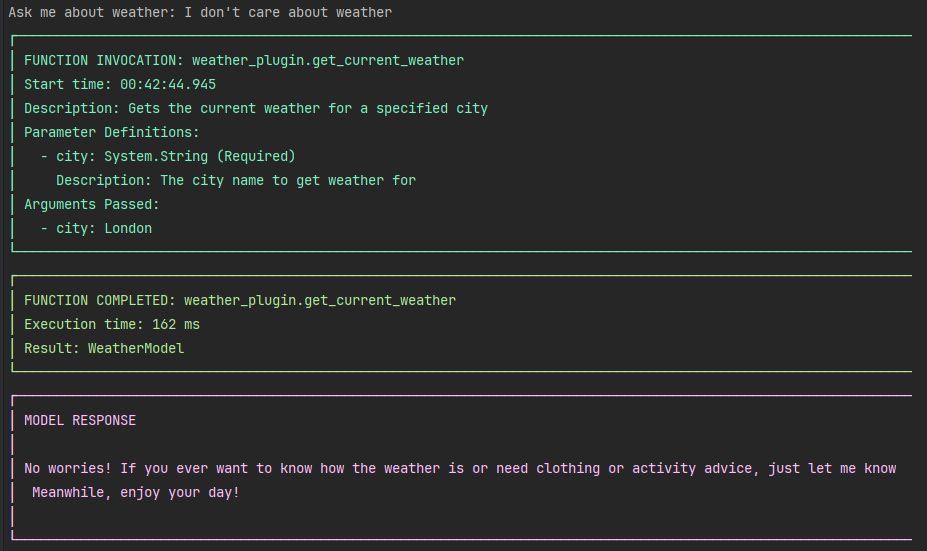
More info you can find here: Function calling with chat completion documentation
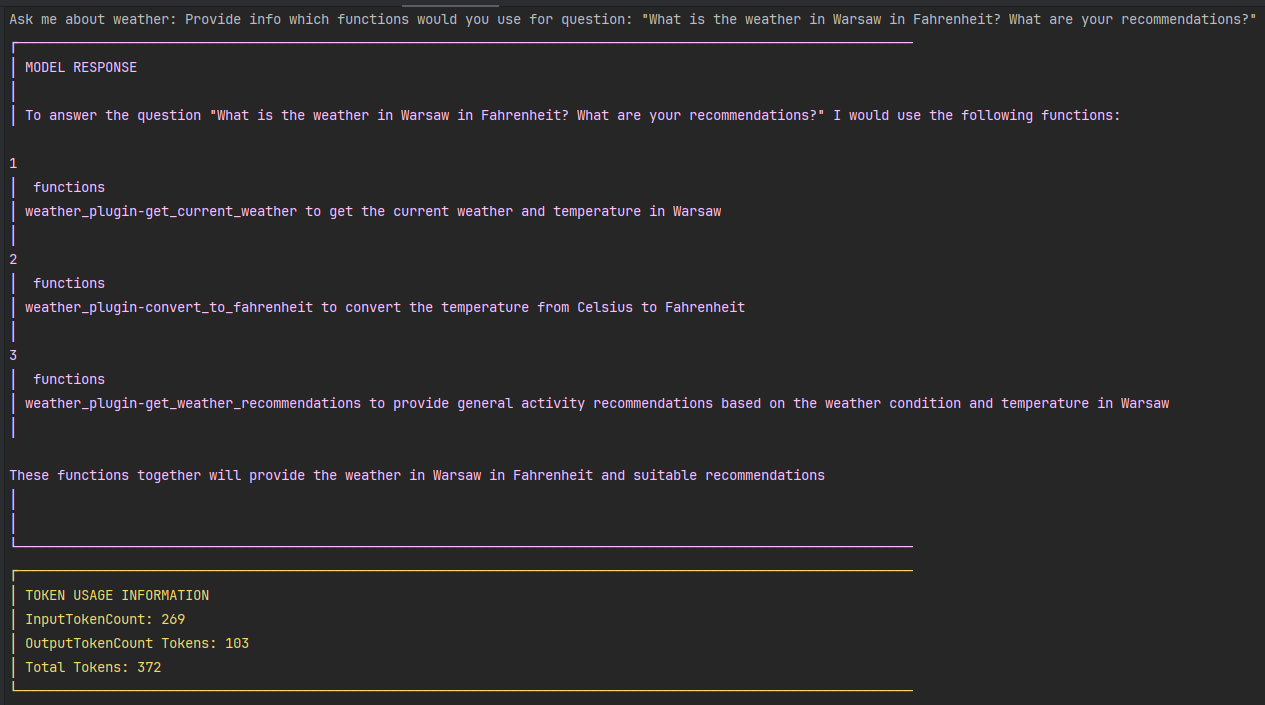
The last option is None, which simply instructs the model to not use plugins at all.
var settings = new OpenAIPromptExecutionSettings()
{
    FunctionChoiceBehavior = FunctionChoiceBehavior.None()
};
An interesting usage of this could be to ask the model which function it would use for a given prompt.
Built-in Plugins 🔧
Beyond the possibility to create plugins yourself, there are also built-in plugins that are worth mentioning.
You can find the complete list in the Microsoft.SemanticKernel.Plugins.Core documentation.
Some of them are: TimePlugins, MathPlugin or HttpPlugin. I will create a separate post on how to use them.
comments powered by Disqus